
IN
Customer requestUpdate my billing email
Now
Grounded AI support
Fyne AI works from approved knowledge and ticket context. Drafting starts on Free, Pro adds agent-reviewed Autopilot, and Business can close confident routine requests with Auto Resolve.
No separate per-agent AI add-on. Usage follows the visible plan allowances.
Customer requestUpdate my billing email
NowFyne AIAuto Resolve
WorkingApproved source matchedChange your billing email
TrustedAnswer sent · Full history saved
One AI across the entire ticket
Fyne AI works from the moment a request arrives until the answer is delivered and the history is saved.
Turns long threads into a clear description of the issue, customer, and current state.
Finds relevant answers from the help content your team already trusts.
Gives agents a practical path forward instead of another blank ticket.
Prepares a clear response using the request, ticket history, and matching knowledge.
Business Auto Resolve can answer and close eligible routine requests after your team trains, tests, configures, and enables it.
Keeps the request, answer, and resolution attached to the ticket for your team.
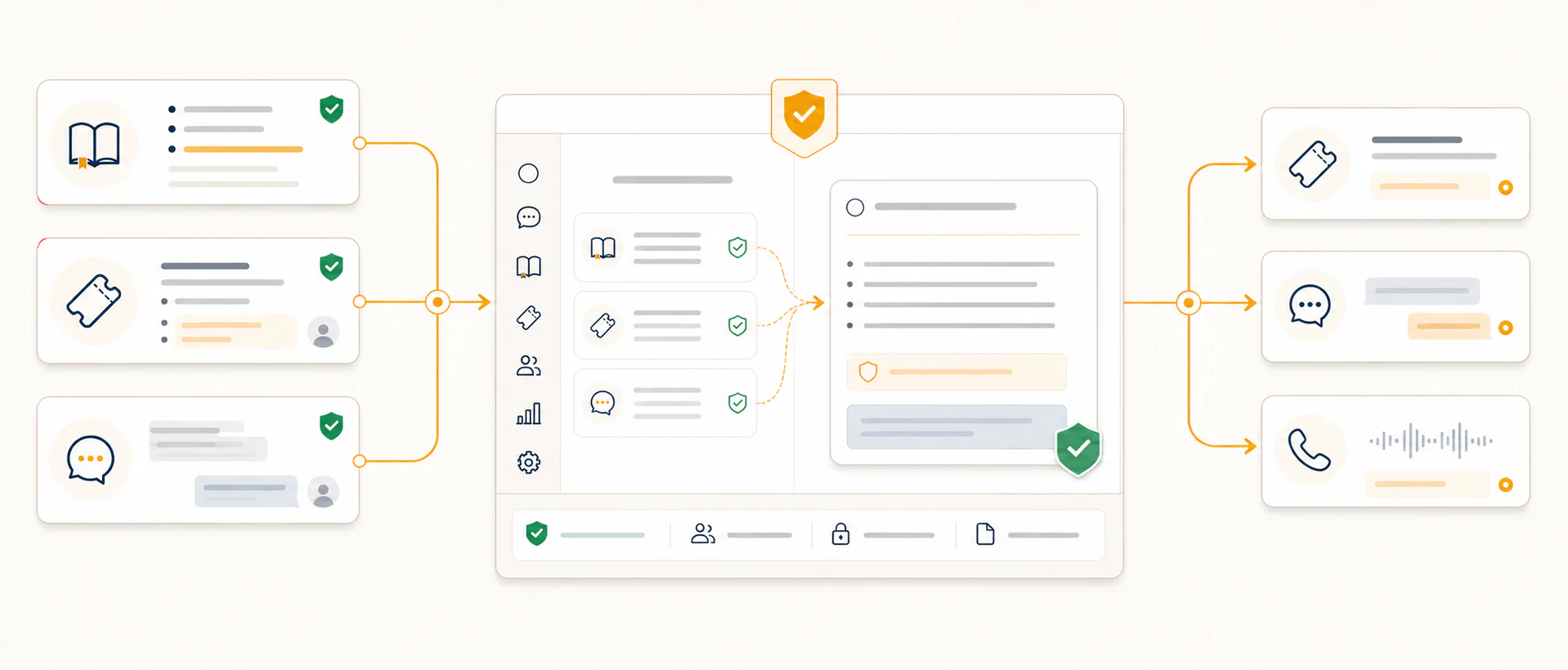
Fyne AI brings together approved help articles, the current request or conversation, and relevant resolved-ticket patterns to produce a useful answer with the right context.
Context Engineering for Customer Support
Reliable support AI needs more than a clever prompt. Fyne AI assembles a support context graph from the right knowledge, customer conversation, team guidance, examples, safeguards, and permissions at the moment it responds.
FyneDesk gives your team a practical workspace for shaping that context—without pretending your settings are retraining a foundation model.
Billing email changes: four trusted sources are ready.
Grounded repliesAssist and Auto Resolve
LiveConversation-aware answersPortal and website widget
LiveCall-aware assistanceShared context and guidance
Coming soonTeach once. Carry the same approved knowledge and behavior across every supported conversation.
Choose approved knowledge and relevant support history instead of sending the AI everything and hoping it finds the signal.
Set tone, language, organization rules, and boundaries that shape every supported customer-facing response.
Run representative questions, inspect grounded answers, and turn gaps into better knowledge or clearer guidance.
Review performance by type of request and keep sensitive or uncertain work with a person.
Fyne AI for Live Chat
Business organizations can use Fyne AI in supported live-chat experiences. It answers from maintained knowledge, follows the current conversation, and can bring in a person with the conversation intact.
Knowledge-first answersFyne AI responds from the help content your team maintains.
Natural follow-upsIt keeps the current conversation in view so short follow-up questions make sense.
One-step human handoffCustomers can bring in a person, and your team receives the conversation and context.
A thoughtful finishOffer an optional 1–5 rating and a customer-requested email transcript after the chat.
From request to resolution
FyneDesk identifies what the customer needs and keeps the ticket history in view, so the response starts with context.
Your knowledge base gives FyneDesk a reliable source for common answers instead of forcing agents to repeat the same steps.
Business Auto Resolve can answer confident routine requests. When a person is needed, the agent gets the request, history, and useful context.
Automation without losing control
FyneDesk is built to remove repetitive work, not judgment. Your knowledge stays the source. Your agents stay available for requests that need empathy, investigation, or a decision.
Read the AI product guide →What changes for your team
Route confident, repeatable questions through an approved automation path.
Use grounded drafting or automation at the point a request arrives.
Keep answers tied to the knowledge and guidance your team maintains.
Keep uncertain, sensitive, or judgment-heavy work with an agent.
Context engineering questions
Context engineering is the practice of deciding what information, guidance, conversation history, and safeguards an AI receives before it answers or acts. Fyne AI assembles that governed information into a support context graph for the current task, using approved knowledge, the current ticket or conversation, relevant resolved tickets, response style, and escalation rules.
No. FyneDesk does not retrain a foundation model on your workspace. Your team curates the knowledge, instructions, examples, tests, and permissions supplied to Fyne AI when it works.
The Fyne AI Training Lab gives administrators a structured way to teach from approved knowledge, guide response behavior, test sample questions, review outcomes, and decide which kinds of work may move toward greater autonomy.
Fyne AI uses shared knowledge and guidance for supported ticket and live chat experiences. AI-assisted phone support is planned, and the Voice channel is clearly marked as coming soon.
External AI assistants
Fyne AI works inside FyneDesk. Separately, our governed MCP connection lets supported external assistants use FyneDesk tools within your workspace policy and user permissions.
Resolve the repeatable. Focus on the important.